
The Ashby offer form is where all pertinent information regarding the offer is entered. This includes information for the candidate, that they receive as part of the offer letter, as well as essential information required in order to process the new hire in Workday.
Some fields are self-explanatory, others may seem a little confusing at first. If in doubt check the descriptions below or contact the Recruitment Operations team for advice.
Opening
This is the specific position that the candidate will fill in Workday. An offer can only be created against against an available opening. If there is no opening available to select, inform the hiring manager and raise a ticket with People Services as this will need to be amended in Workday before the offer can proceed.
First & Last Name
It is important to get all the candidate's names right, but it is especially important to get the legal name correct so that it matches their right-to-work documentation on their start date.
The preferred name will be used to create their Deliveroo email address (e.g. firstname.lastname@deliveroo.co.uk).
Right to Work
Does the candidate require visa sponsorship from Deliveroo to work where the job is located. If so, check with the Global Mobility team (shona.whyte@deliveroo.co.uk) to ensure we are able to facilitate a right-to-work visa for the candidate before extending the offer
Email, Phone Number and Address Details
The section will only be visible after the candidate's offer has been marked as 'Accepted'. After the candidate accepts please update the offer and fill in these details. If these are left blank the hire cannot be sent to Workday.
Email address and phone number will be prefilled from the candidate's profile if available.
Worker Sub-Type
Whether the role the candidate is filling is Permanent, Fixed Term or a Contractor. This will be prefilled from the job based on what is in Workday. Any changes to this field will need to be done in Workday otherwise the hire will not be processed.
Hire Type
For New Hires only. Select either New Hire, Rehire or Conversion ( converting FTC or Contingent Worker to a Permanent role).
Contract Worker Reason
For Contingent Workers only. Select 'Initial Engagement' for contractors that we have not worked with previously, and 'Re-Engagement' if they have worked with Deliveroo before.
Workday ID
For Rehires, Internal Transfers and re-engaging with Contract Contingent Workers only. You can find the Workday ID for all previous employees and contractors in this report.
Day Current Contract Should End
For contractor conversions only. This will end their current contract so that they can be moved to a new Permanent or FTC role. This date must be before their start date and is advised to be the day before. This may be different from their initial contract end date.
Start Date
The start date for the candidate. A provisional one can be entered initially as long as the offer is updated with the correct and final start date before marking a candidate as hired.
If you mark a candidate as hired and need to change the start date, you'll need to contact people@deliveroo.co.uk to have the contract amended and Workday updated. Changing the start date here will not update their profile in Workday.
Contract End Date
For Fixed Term and Contract Contingent Workers only. Please enter the contract end date here.
Contract Length (for offer letter)
For Fixed Term only. Enter the length of contract here in days, weeks or months (e.g. 4 months, 6 weeks, 10 days). This is only for use on the candidate's offer letter and is not sent to Workday.
Job Level, Compensation, Location or Notice Period change?
If the candidate is an existing Deliveroo employee and transferring to a new role we need to indicate whether the job change includes changes in level, comp, working location or notice period. This will then specify on the offer letter whether they will receive a new contract or a 'Change of Job Title' letter. This is just for the offer letter and is not sent to Workday.
Out of cycle approval confirmation
If your internal hire, transfer or conversion falls under the out-of-cycle comp and level change policy, confirm that you've got the required approvals. You can review the current policy here.
Manager, Job Level, Location & Weekly Hours
These are all prefilled from the job based on what is in Workday. Please do not change in the offer form. Any updates should be made in Workday otherwise the hire will not be processed.
Working Hours (India Only)
For India hires only. This will prefill a default value 'Monday to Friday 9:30 am to 5:30pm'. Please update where a different working pattern is required (such as for shift workers). This is for use on the offer letter only and will not be send to Workday.
Salary/Contract Rate
Enter the salary, hourly or pay rate amount here, making sure you remember to select the correct currency.
Equity
For L7+ roles only. Default equity unit is 'Options'. Only people with US tax obligations should receive RSUs, for example, if they are a US citizen or a green card holder
L7 & L8 - If there is equity included as part of the overall compensation package for the job, this will be prefilled from the job based on what is in Workday. Any changes to this amount will need to have approval for the Rewards team.
L9+ - Equity will be blank. If equity is included as part of the overall compensation package this will need to be approved by the Rewards team on a case by case basis and then entered here.
Do not attempt to change this value without first getting the appropriate approvals. Any changes will not override what is in Workday.
Sign-on Bonus
If a sign-on bonus is included as part of the offer, enter the amount here with the reason and payment schedule. Default payment schedule is 'in first payroll'. Different payment schedules will require HR approval.
Commission Plan
If the employee is going to be on a sales commission plan.
Bonus Type, Value & Frequency
For Permanent and Fixed Term employees only. Bonus type, value and frequency will all be prefilled based on the bonus plan assigned to the job from Workday. Any changes to this will need to be made in Workday otherwise the hire will not be processed.
Relocation Support
Does this offer include relocation support? Ensure you have budget approval before offering relocation. If unsure refer to the Relocation Guide for Recruiters.
Representative Allowance (Belgium Only)
For Belgium hires only. Enter the appropriate Representative Allowance based on the job level and team. This is for the offer letter only and will not be sent to Workday.
Offer Valid Until
An expiration date on the offer must be included (as this is a formal offer of employment, it will continue in perpetuity unless we add an expiry date). This is for the offer letter only and will not be sent to Workday.
 Pre-Hire ID
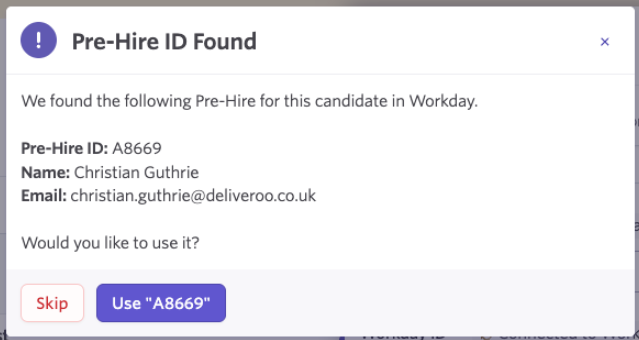
Do not enter anything here. When making a Rehire, Internal Hire or reengaging with Contract Contingent Worker, this will auto-fill from Workday based on the Workday ID you entered.
When you click 'Submit' after completing the offer form, a pop-up similar to this will appear. Click 'Use "xxxxx"' and the Pre-Hire ID will be auto-populated.
Comments
0 comments
Please sign in to leave a comment.